
Product Updates
May 2026 Updates
Blackbaud Updates
Admission Event Importer
Added a new Parent Type selector to the Blackbaud Admission Event importer, allowing Admin to select either the Parent of Incoming or Parent of Candidate or both.
Contacts Setup Improvements
An addition to Global Setup /Contacts/Advanced Options/Setup Parents Category has been made by replacing the standard text input fields with a multi-select dropdown for event categories.
This update applies to:
CategoryID for Prospective Parents
CategoryID for Current Parents
Importer Updates
Slot Import Enhancements
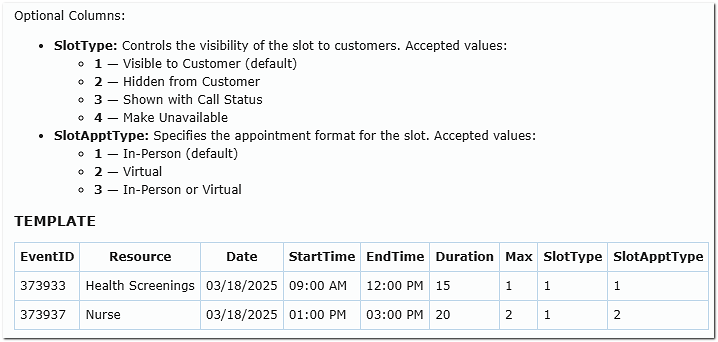
Added the ability to define both Slot Type and Appointment Type directly within the Slots Import file.
Resource and Class Removal Updates
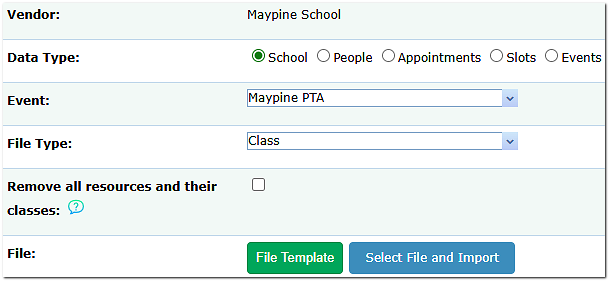
Additional updates were made to the option allowing Admins to delete existing resources, classes, and enrollments directly from the Import page before uploading new data, making it easier to remove bad data without leaving the Importer page. Changes include:
The sentence, Remove existing classes has been renamed to Remove all resources and their classes.
An issue where the Remove all resources and their classes option did not fully remove resources from all scheduling areas has been corrected.
Resources are now correctly removed from:
Appointments Tab > Teachers
ClassEditor Tab > Teachers
To locate this feature on the Imports page, click the Class file option within the File Type drop-down menu.
Reporting Updates
New Email Actions
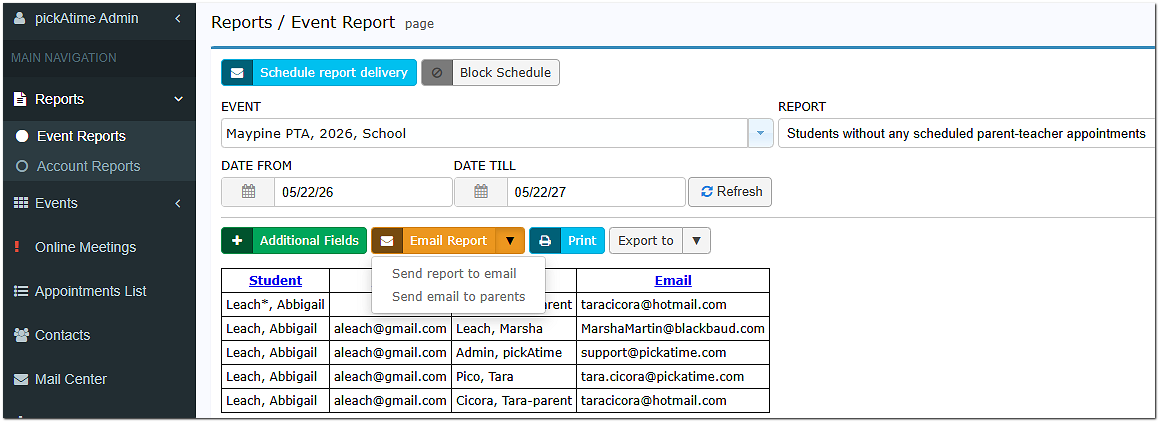
Added a new Send Email to Parents button to the following reports:
Students without any scheduled parent-teacher appointments
Students without any scheduled parent-teacher appointments by class
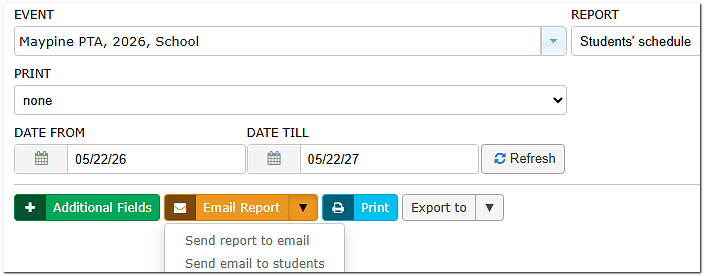
Added a new Send Email to Students button to:
Students’ Schedule
Report Name Updates
Renamed the following reports for improved clarity:
Email Report Improvements
Button Label Updates
Renamed the orange Send email button to Email Report
Button Placement Improvements
The gray Email Report button has been moved next to the Parent/Teacher dropdown to align with the orange Email Report button for a more consistent layout.
Email Processing Improvements
The Email Report to Teacher/Parent/Student actions now display a processing message indicating:
Emails are currently being sent
A summary notification will be delivered once processing is complete
March 2026 Updates
Log-In & Registration Updates
- The “Do not allow self-registration” option is now automatically disabled when “Show the scheduler to users before they log in” is enabled.
→ This allows participants to create an account seamlessly when they’re ready to book. - New feature: Sign up with Google
→ Participants can now register using Google when:- “Show scheduler before login” is enabled
- “Allow login with external provider” is enabled
- When participants are creating a new account, a second Password (Confirm)" field has been added to the Sign Up form.
Location for Log-Ins and Registrations: Global Setup/ Business/ Registration and Login Settings
Google Updates
- Google Workspace integration will now display “Enabled” only when syncing is error-free
- Automatic email notifications are now disabled when participants create or update Google Calendar events
→ Helps reduce unnecessary email volume
Reporting Updates
- Event Reports now display all teacher team members in the Teachers column
- A new field, “Last Logged In,” has been added within the List of Administrators report.
Location: Reports/ Account Reports/ List of Administrators (click the green “Additional Fields” button)
Events & Scheduling Updates
Class Import Improvements
You can now delete existing resources, classes, and enrollments directly from the Import page before uploading new data, making it easier to remove bad data without leaving the Importer page.
To locate this feature on the Imports page, click the Class file option within the File Type drop-down menu.
Featured Events
pickAtime has added a new option that allows the account Admin to choose to display all events at once or list the "featured" event first, with a search bar for the others. This feature can be activated or deactivated on the Event Settings page, accessible from the Events Preview in the upper-right corner.
Table View Customization
Admins can now set the default view:
- Expanded (fixed time steps – classic view, may require more scrolling)
- Condensed (shows variable time steps - may require less scrolling )
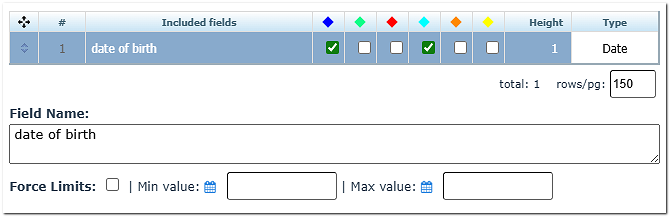
An update has been made to the Date Field in both the Appointment and Contact Field Setup sections. This update allows you to add 'force limits' to control the date range that participants can enter to ensure that there are fewer erroneous entries.
Forced Reminder Emails
- Admins can now send reminder emails from the Appointments List even if reminders are disabled for the event
- These are labeled: “Sent Reminder Forced” within the Contact’s log.
January 2026 Updates
- We have changed the name of the Email and SMS Setup page to Notification Setup. On the Notification Setup page, we have added two additional sections. A Resource Notification Email Section and a Calendar Event Notification Section. The Resource Notification section will allow you to have appointment notification emails sent to your resources or teachers. The Calendar Event Notification Section will allow you to customize the calendar reminders.
- We have added an integration with ClassLink.
- We have added an integration with the payment processor Stripe.
- Upcoming: We will be adding an integration with Veracross in the next several months.