
Product Updates
August 2026 Updates
Website Contact Updates
Refund Option Update
The Make a refund for all paid appointments option will now appear when deleting slots if On all resources for all events of the same type is selected. This will allow admins to offer mass refunds quickly and cleanly. This option will appear even if the current event has Allow to cancel the paid appointment and get a refund disabled.
Changes to Verbiage on the Tabs and Settings Sections
Events Settings / Events Table Columns
Verbiage changed to: These settings allow you to add/delete unique columns for your events, change their order and customize their appearance. Administrators have the ability to add new columns, swap columns and set the appearance of the columns in the Admin UI.
Online Meetings page
Verbiage changed to: This table displays the online meeting sync status for each teacher or resource.
Additional verbiage changes were made to assist Admins in understanding features better.
Export Setup: Indicates that the teacher or resource has successfully connected their Google Calendar and/or Zoom app with pickAtime.
Import Setup: Indicates that their external Google Calendar is currently blocking off unavailable times in pickAtime.
 Important: Blocking availability using an individual resource or teacher's external calendar is not recommended for PTA events.
The resources and their appointments below are missing meeting links. To resolve:
Google Meet: Ensure the teacher has synced their Google Calendar
Zoom: Review your Zoom settings or our FAQs for Zoom
Teams: Ensure the teacher has synced their Microsoft Calendar
Vendor View Setup page
New verbiage changes include:
SIMPLE PTA VUI
The checkbox for Display Class Names on the Settings tab has been removed.
July 2026 Updates
Events
-
pickAtime has removed the "Maximum Allowed Appointments per Resource" setting from the PTA and Simple PTA events.
Reports
- pickAtime added a new "Columns Order" button to all Event Reports, allowing users to customize the order of both default and additional columns.
June 2026 Updates
Captcha
-
pickAtime has replaced Google Captcha with Cloudflare.
Clever
Data Importer
-
pickAtime has implemented the Clever v3.0 API data importer with the ability to switch between the previous v2.0 and the new v3.0 version per request to pickAtime Support.
- The option of importing parent and relationship data, if available in Clever, is also now available.
May 2026 Updates
Blackbaud Updates
Admission Event Importer
-
Added a new Parent Type selector to the Blackbaud Admission Event importer, allowing Admin to select either the Parent of Incoming or Parent of Candidate or both.
Contacts Setup Improvements
-
An addition to Global Setup /Contacts/Advanced Options/Setup Parents Category has been made by replacing the standard text input fields with a multi-select dropdown for event categories.
-
This update applies to:
-
CategoryID for Prospective Parents
-
CategoryID for Current Parents
-
Importer Updates
Slot Import Enhancements
-
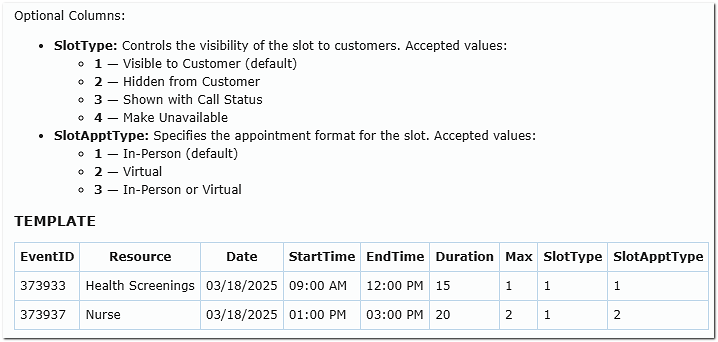
Added the ability to define both Slot Type and Appointment Type directly within the Slots Import file.
Resource and Class Removal Updates
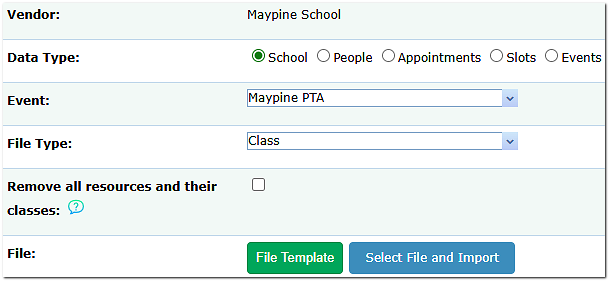
Additional updates were made to the option allowing Admins to delete existing resources, classes, and enrollments directly from the Import page before uploading new data, making it easier to remove bad data without leaving the Importer page. Changes include:
An issue where the Remove all resources and their classes option did not fully remove resources from all scheduling areas has been corrected.
Resources are now correctly removed from:
-
-
Appointments Tab > Teachers
-
ClassEditor Tab > Teachers
-
To locate this feature on the Imports page, click the Class file option within the File Type drop-down menu.
Reporting Updates
Email Report Improvements
Button Label Updates
-
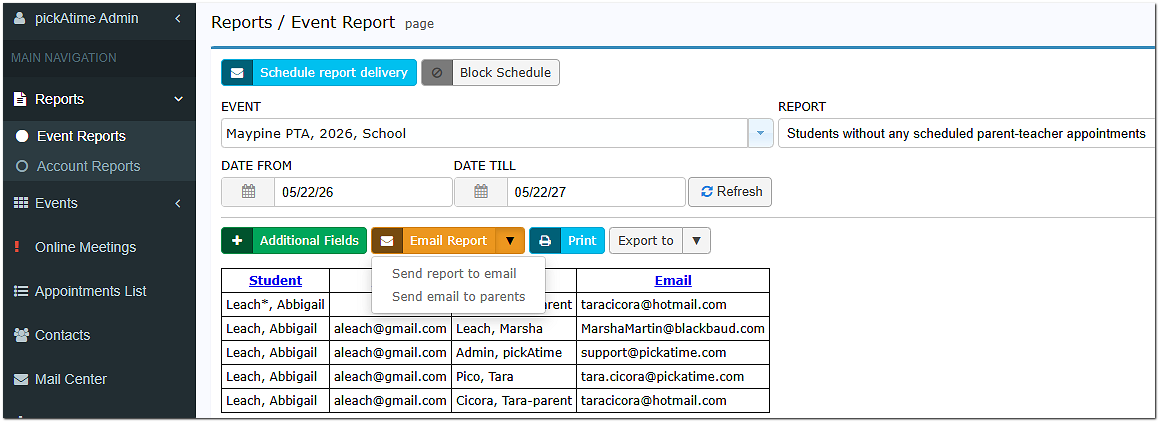
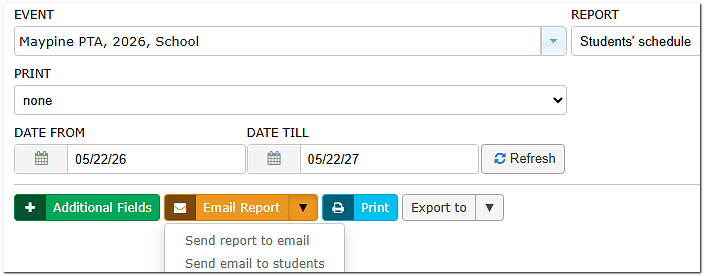
The orange Send email button has been renamed Email Report and now includes multiple email options. Email options include:
- Send to specific email - all reports
- Send Email to Parents - for the following reports:
-
Students without any scheduled parent-teacher appointments
-
Students without any scheduled parent-teacher appointments by class
- Parent Schedule Report
-
- Send Email to Students - for the following report:
- Students’ Schedule
-
The Email Report to Teacher/Parent/Student actions now display a processing message indicating:
-
-
Emails are currently being sent
-
A summary notification will be delivered once processing is complete
-
-
Report Name Updates
Renamed the following reports for improved clarity:
| Previous Name | Updated Name |
|---|---|
| Students whose parents have not booked ANY appointments | Students without any scheduled parent-teacher appointments |
| Students whose parents have not booked appointments PER CLASS | Students without any scheduled parent-teacher appointments by class |
Online Meetings Page Updates
The Online Meeting Issues page has now been renamed to Online Meetings and now acts as your centralized dashboard for overseeing your virtual integrations. At a glance, you’ll be able to track active sync statuses, monitor overall setups, and confirm that your unique appointment meeting links are being generated exactly as they should be.
Click on one of these pages below to see the page for your integration: fgf
SMS Updates
-
Improved SMS phone number formatting to prevent country codes from being accidentally added twice to phone numbers that already include them.
-
Updated the Contact Log to show more detailed text message delivery results, making it easier to identify whether a message was successfully sent or why it failed.
-
Added an automatic “[Replies unmonitored]” message to outgoing text messages so recipients know that replies to system-generated SMS notifications are not monitored.
March 2026 Updates
Log-In & Registration Updates
- The “Do not allow self-registration” option is now automatically disabled when “Show the scheduler to users before they log in” is enabled.
→ This allows participants to create an account seamlessly when they’re ready to book. - New feature: Sign up with Google
→ Participants can now register using Google when:- “Show scheduler before login” is enabled
- “Allow login with external provider” is enabled
- When participants are creating a new account, a second Password (Confirm)" field has been added to the Sign Up form.
Location for Log-Ins and Registrations: Global Setup/ Business/ Registration and Login Settings
Google Updates
- Google Workspace integration will now display “Enabled” only when syncing is error-free
- Automatic email notifications are now disabled when participants create or update Google Calendar events
→ Helps reduce unnecessary email volume
Reporting Updates
- Event Reports now display all teacher team members in the Teachers column
- A new field, “Last Logged In,” has been added within the List of Administrators report.
Location: Reports/ Account Reports/ List of Administrators (click the green “Additional Fields” button)
Events & Scheduling Updates
Class Import Improvements
You can now delete existing resources, classes, and enrollments directly from the Import page before uploading new data, making it easier to remove bad data without leaving the Importer page.
To locate this feature on the Imports page, click the Class file option within the File Type drop-down menu.
Featured Events
pickAtime has added a new option that allows the account Admin to choose to display all events at once or list the "featured" event first, with a search bar for the others. This feature can be activated or deactivated on the Event Settings page, accessible from the Events Preview in the upper-right corner.
Table View Customization
Admins can now set the default view:
-
-
-
-
- Expanded (fixed time steps – classic view, may require more scrolling)
- Condensed (shows variable time steps - may require less scrolling )
- Users can toggle views directly within the scheduler
-
-
-
An update has been made to the Date Field in both the Appointment and Contact Field Setup sections. This update allows you to add 'restrict dates' to control the date range that participants can enter to ensure that there are fewer erroneous entries.
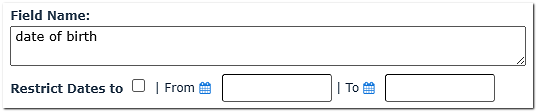
Locations are Global Setup /Contacts/ContactFieldsSetup and EventsManagement/Settings/AppointmentFields
Forced Reminder Emails
-
- Admins can now send reminder emails from the Appointments List even if reminders are disabled for the event
- These are labeled: “Sent Reminder Forced” within the Contact’s log.
January 2026 Updates
- We have changed the name of the Email and SMS Setup page to Notification Setup. On the Notification Setup page, we have added two additional sections. A Resource Notification Email Section and a Calendar Event Notification Section. The Resource Notification section will allow you to have appointment notification emails sent to your resources or teachers. The Calendar Event Notification Section will allow you to customize the calendar reminders.
- We have added an integration with ClassLink.
- We have added an integration with the payment processor Stripe.
- Upcoming: We will be adding an integration with Veracross in the next several months.